
Vueroid S1 4K vs D22 4K: Which Dash Cam Should You Buy?
The Vueroid S1 4K and the newer Vueroid D22 4K have some important differences that go well beyond their 4K names. How you change settings, remove the camera, manage windshield reflections, and mount the rear camera can all make one a better fit for your vehicle.
The S1 has the stronger case if you want an onboard screen, convenient removal, a CPL filter, and better rear-camera performance at night. The D22 has its own practical advantages, particularly its parking-recording button and a rear camera with more mounting flexibility.
Here is how those differences work in everyday use, along with the front and rear footage comparisons that help put them into context.
Quick Summary
- The S1 offers onboard settings, USB-C file access, and removal without disconnecting the installed cables.
- The S1’s included CPL filter reduces windshield reflections that can obscure useful road detail.
- Both rear cameras record QHD, but the S1’s STARVIS 2 sensor performs better at night.
- The D22 adds a parking-recording shortcut and more flexible rear-camera adjustment for challenging installations.
Table of Contents
- Controls and Settings: The S1 Screen Makes a Difference
- Connections, File Access, and Removing the Camera
- CPL Filter: A Meaningful Advantage for the S1
- Rear Cameras: The Same Resolution, Different Sensors
- Interior Camera: Both Support the Same Adjustable Unit
- Real-World Footage: Tunnels, Highways, and Rear Views
- Which Vueroid 4K Dash Cam Should You Buy?
- Professional Dash Cam Installation
Controls and Settings: The S1 Screen Makes a Difference
Both cameras provide physical controls for the microphone, manual recording, and Wi-Fi. The layout is different, though, so it is worth knowing where those controls sit before you need them.
- Microphone: Both units have a button for microphone control.
- Manual recording: The D22 uses one of its stacked front buttons, while the S1 uses the centre button below its screen.
- Wi-Fi: The D22 places this at the bottom of its stacked button group. The S1 has a separate Wi-Fi control below the display.
The D22 adds a parking-recording shortcut
A useful feature on the D22 is the ability to turn automatic parking recording on or off using a physical button. The camera gives a spoken confirmation when the setting changes.
That is handy if you get home and do not want parking recording operating in that location. Instead of opening an app and finding the setting, you can switch it directly on the camera.
The S1 lets you work without a smartphone app
The S1’s built-in display is more than a way to see an image. You can enter the settings menu, make changes, and return to recording without connecting a phone.
You can also check the views from the front, rear, and interior cameras, depending on which cameras are connected. That makes it easy to confirm that a camera is aimed correctly and that nothing is blocking its view.
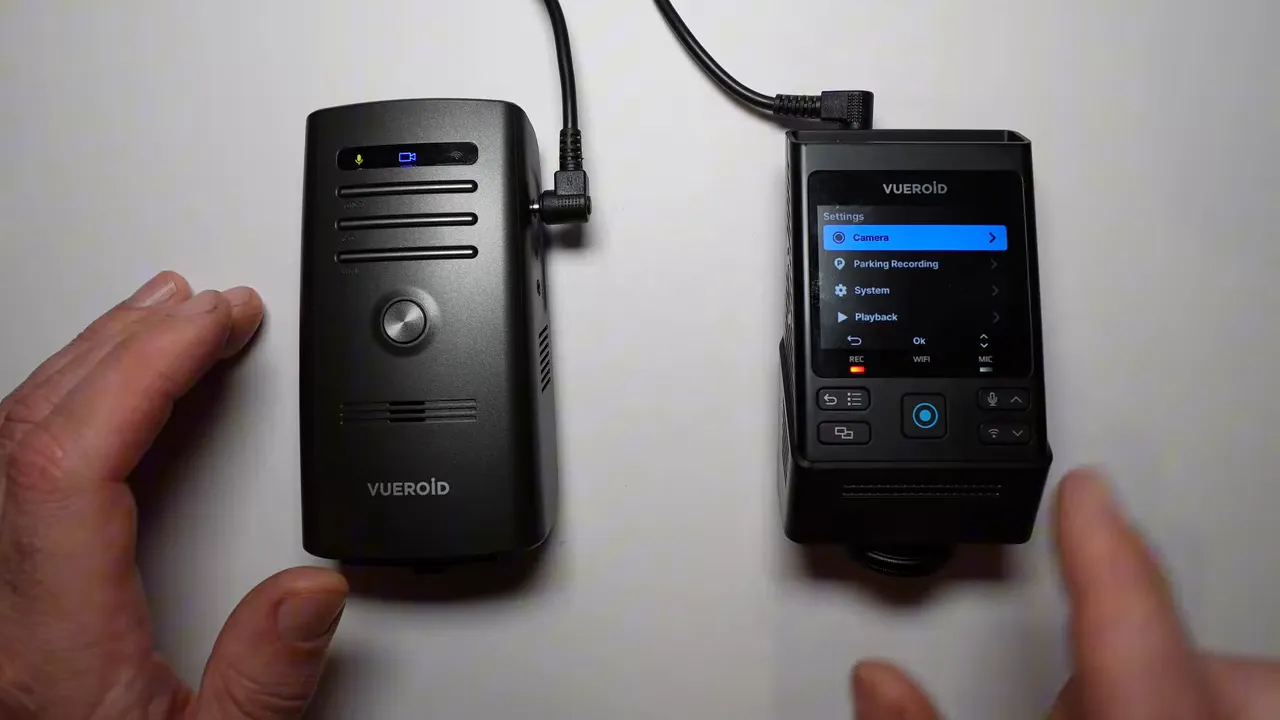
With the D22, you need the smartphone app to verify camera angles. If you prefer to handle setup and quick checks on the dash cam itself, this is a clear advantage for the S1.
Connections, File Access, and Removing the Camera
Both units have an SD card slot on the side. The D22 also has a physical on/off switch.
The bigger distinction is where the cables connect and what happens when you want to take the camera out of the vehicle.
D22: Connections on the camera body
The D22 has its power, rear-camera, and interior-camera inputs on the side of the unit. If you want to bring it into the house, you need to unplug those cables before removing the camera from its mount.
S1: Cables stay with the mount
The S1’s power, rear-camera, and interior-camera connections sit at the top, in its mounting assembly. You can detach the camera while leaving the cables connected to the mount.
That is a small design difference with a useful payoff: you can take the camera with you without disconnecting and reconnecting every cable.
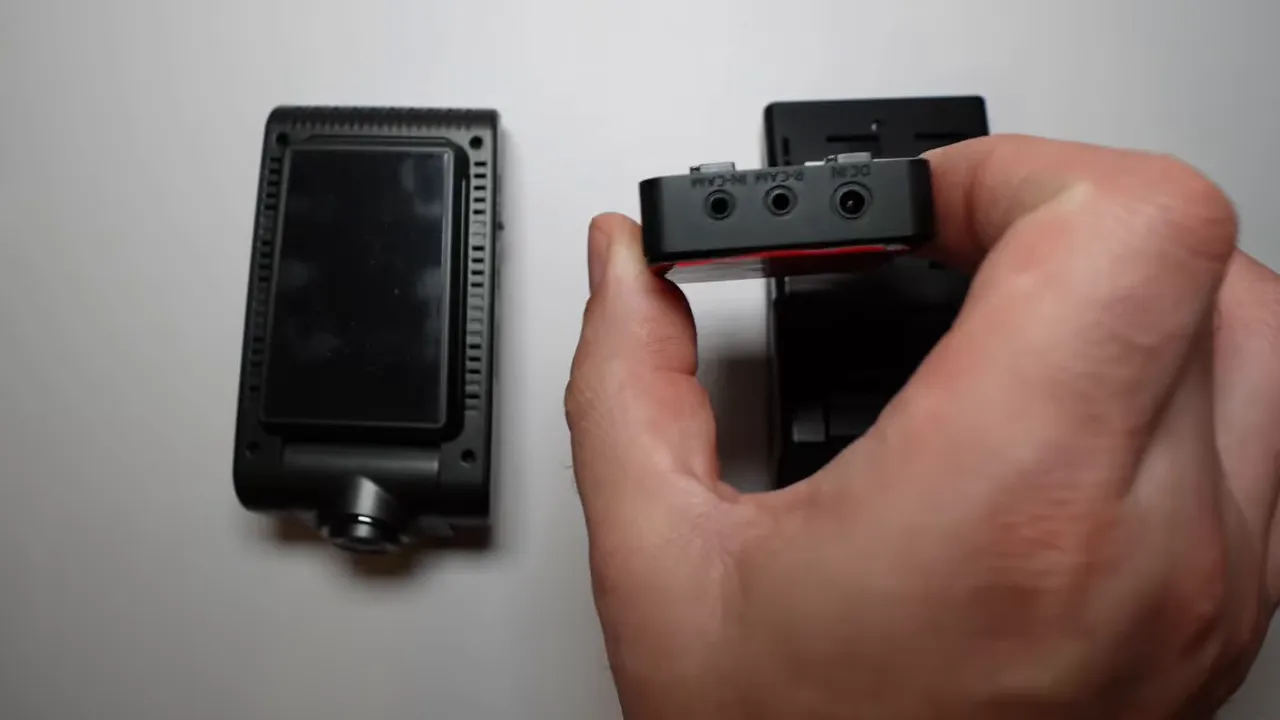
The S1 also provides USB-C file access
The S1 has a USB-C connection that lets you connect it directly to a computer. You can also connect it to a compatible USB-C phone, such as an iPhone 15 or newer or a compatible Android device, and access recordings through the phone’s file browser.
At an accident scene, that can be convenient. You can remove the S1 from the mount and connect it directly to your phone to access the files, rather than relying only on a wireless connection.
CPL Filter: A Meaningful Advantage for the S1
The S1 comes with a removable, adjustable polarizing filter, commonly called a CPL filter. The D22 does not offer a CPL filter option in this comparison.
Why does that matter? Windshield reflections can put dashboard shapes and glare over the road scene. Those reflections can interfere with the details you actually need, including a nearby vehicle’s licence plate.
The S1’s CPL filter helps reduce those reflections. It is not just about making footage look nicer. Reducing a reflection over another vehicle can make the recorded image more useful.
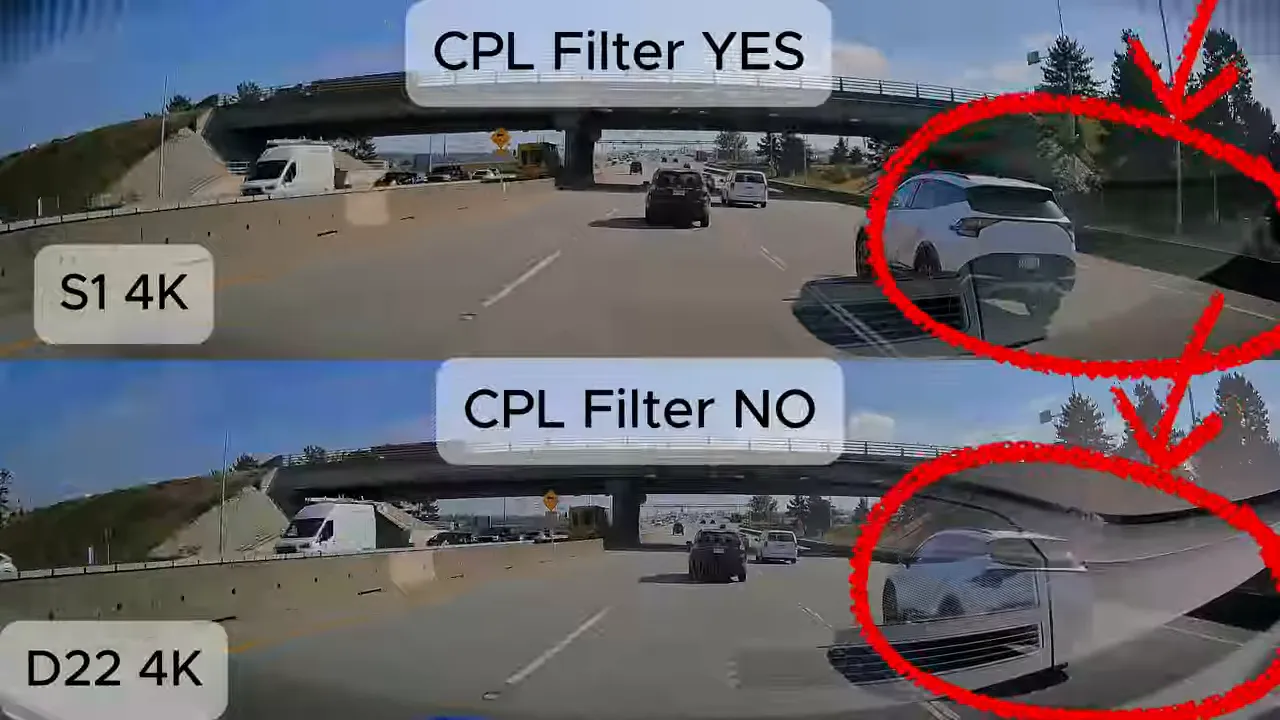
The daytime comparison highlights a white vehicle alongside the test vehicle, with the S1 using its CPL filter and the D22 operating without one. This is an important distinction when comparing the images: both cameras may be labelled 4K, but reflections can still get in the way of useful detail.
Rear Cameras: The Same Resolution, Different Sensors
Both rear cameras record at 2K, also called QHD. The 4K designation in the system names does not mean that the rear cameras are also 4K.
The sensor difference is significant:
- Vueroid S1 rear camera: Sony STARVIS 2 image sensor.
- Vueroid D22 rear camera: Sony STARVIS image sensor from the earlier generation.
The S1 rear camera performs better at night. If you are particular about rear video quality, especially after dark, this is one of the strongest reasons to choose the S1.
For background on the sensor family, Sony provides an overview of its security-camera imaging technologies. For this buying decision, the important point is simple: matching resolution does not mean matching low-light performance.
The D22 rear camera is more flexible to mount
Image quality is only part of the rear-camera decision. You also need a camera that can be mounted and aimed properly in your vehicle.
The D22 rear camera offers more up-and-down movement. That can make it a better mounting option in vehicles such as a Toyota 4Runner, where the installation may require more flexibility.
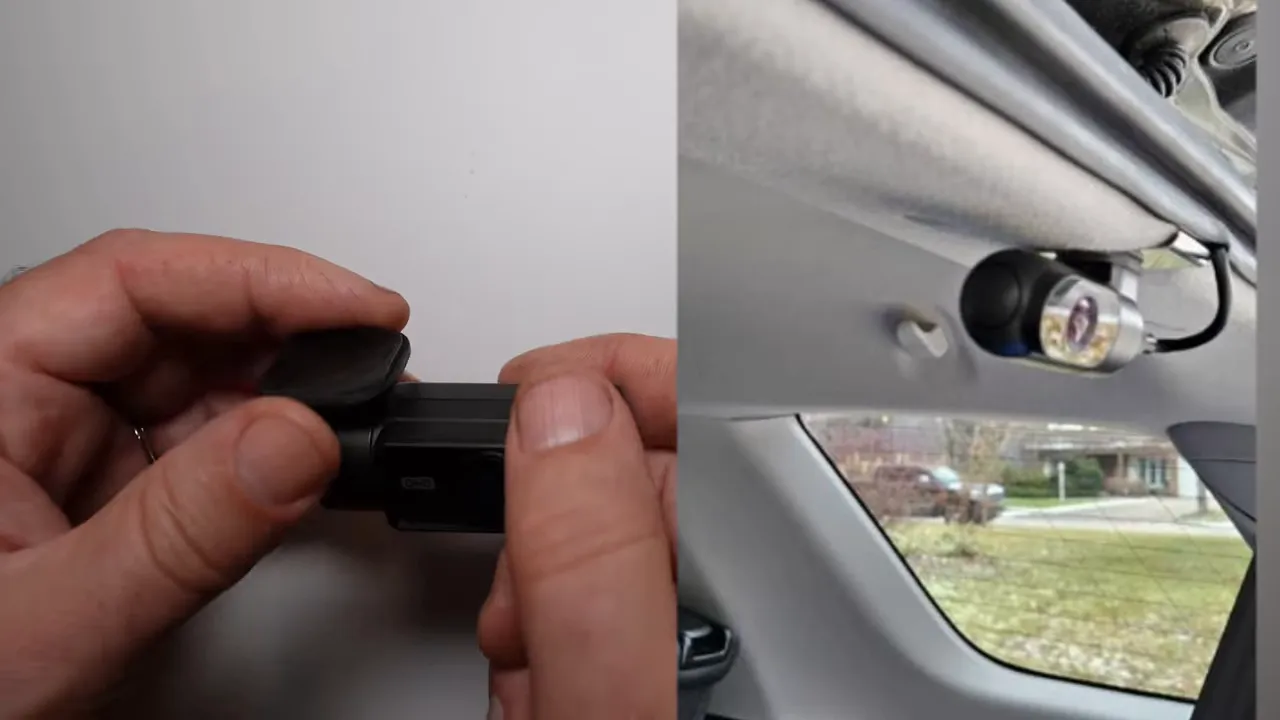
The S1 rear camera has a larger mounting arrangement. In this type of installation, it may need a larger special bracket to position it correctly.
Cable placement affects the installation too
The S1 rear camera’s cable connection sits behind the camera. The connection needs to be tucked into the headliner or hatch area, depending on the vehicle.
That can create a cleaner appearance because you do not see a connector entering the side of the camera. However, it also means the installation needs somewhere suitable to hide that connection.
The D22’s side connection is more visible, but it may suit the available space better. Neither arrangement is automatically the best for every vehicle. The right choice depends on the mounting surface, aiming requirements, and cable route.
Interior Camera: Both Support the Same Adjustable Unit
Both dash cams support the Vueroid S1 interior camera, so this is not a reason to choose one main unit over the other.
The compatible interior camera provides:
- 1080p recording.
- A Sony STARVIS image sensor.
- Up to a 170-degree wide viewing angle.
- Up-and-down and side-to-side adjustment.
That last point is especially useful. If you mount the interior camera on the windshield but mainly want to cover the driver’s window, you can angle it towards that area.
Many interior cameras have more limited adjustment and largely point straight ahead from their mounting position. The extra movement here gives you more control over what the camera actually records.
Real-World Footage: Tunnels, Highways, and Rear Views
The driving comparison includes front footage entering, travelling through, and exiting a tunnel, followed by rear-camera tunnel footage and daytime highway footage from both directions.
Those examples serve different purposes. The tunnel sequence lets you compare the images as the vehicle moves between daylight and darker conditions. The daytime front footage makes windshield reflections easier to assess. The rear footage provides a direct comparison of the two QHD cameras in the same driving environment.
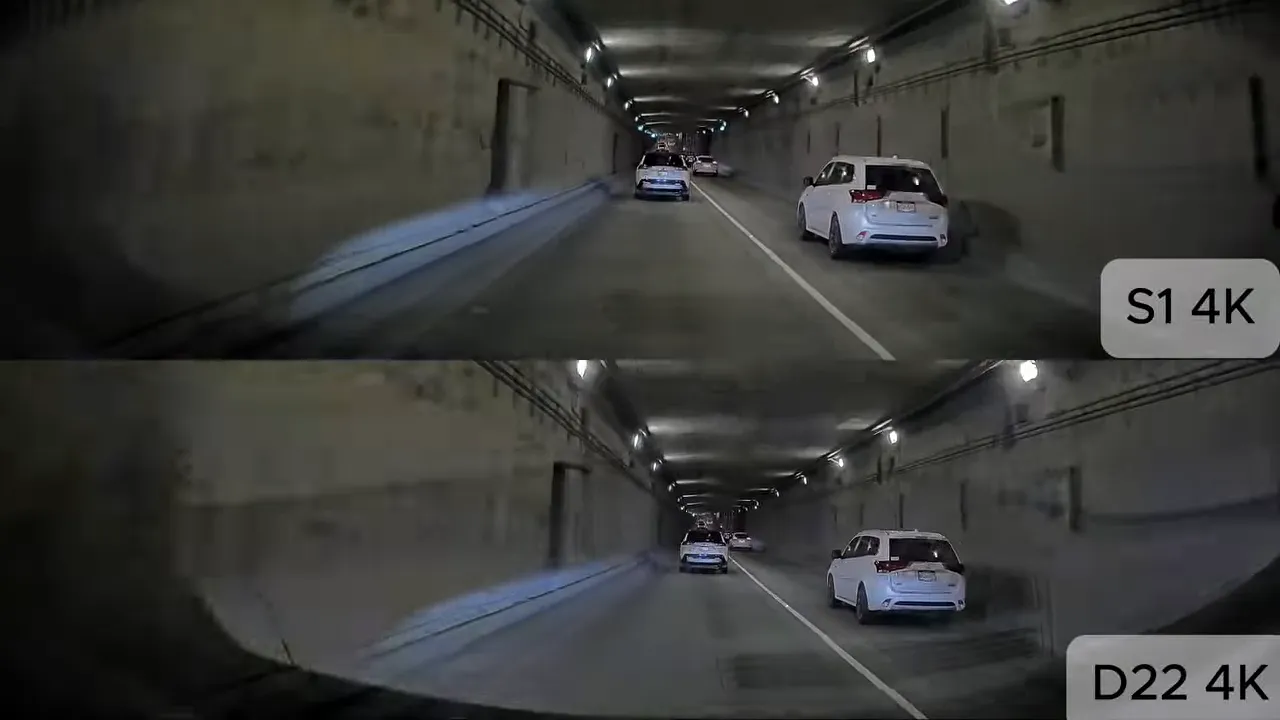
Keep the different tests separate when making your decision. A daytime rear-camera clip does not establish nighttime performance, and a tunnel run is not the same as a full night-driving test. The key rear-camera distinction remains the S1’s newer sensor and its better performance at night.
For the front cameras, the CPL comparison is particularly useful because it connects a physical feature to a visible issue: reflections over the road and surrounding vehicles.
Which Vueroid 4K Dash Cam Should You Buy?
Choose the S1 if image quality and convenience come first
The S1 is the stronger fit if you value:
- Changing settings and checking camera angles on a built-in screen.
- Removing the camera without unplugging all the installed cables.
- Accessing recordings through USB-C on a computer or compatible phone.
- Reducing windshield reflections with an included CPL filter.
- Getting better nighttime performance from the rear camera.
If those are your priorities, the S1 gives you several practical advantages beyond the 4K recording label.
Choose the D22 if its controls and rear-camera fit suit your vehicle
The D22 deserves consideration if you want a quick physical control for automatic parking recording, or if its more adjustable rear camera solves a difficult mounting problem.
For a vehicle that needs considerable rear-camera tilt or has limited mounting space, that flexibility can make a real difference. Just account for the trade-offs: app-based angle checks, unplugging cables to remove the main unit, no CPL filter option, and the earlier-generation rear sensor.
Our advice is to choose the camera around both the footage you need and the vehicle it is going into. The S1 has clear advantages for image quality and everyday access, while the D22 may be better suited to a particular rear-camera installation.
Professional Dash Cam Installation
We offer professional dash cam installation in Greater Vancouver and Greater Toronto, with one-, two-, and three-channel packages available. Our range includes Vueroid, Viofo, and Thinkware systems, and you can request a quote for a camera and installation package suited to your vehicle.
|