
Vueroid S1 4K Dash Cam Review: Is It One of the Best Dash Cams?
The Vueroid S1 4K is a seriously well-rounded dash camera, particularly for anyone who cares about useful parking mode, low battery draw, solid video quality, and settings that actually accommodate modern vehicles. It is available as a front-only unit, a front and rear system, or a front, rear, and interior setup.
The front camera uses a Sony STARVIS 2 IMX678 sensor with a 151-degree viewing angle. The rear camera uses a Sony STARVIS 2 IMX675 QHD 2K sensor with a 160-degree viewing angle. The interior camera uses a Sony STARVIS IMX307 sensor, has infrared for low-light cabin recording, and covers a very wide 170-degree angle.
There is also an exterior rear camera accessory that plugs into the interior camera port. With its 12 metre, 40 foot cable and infrared capability, it is a practical option for a Ram ProMaster, Ford Transit, RV, motorhome, or other larger vehicle.
Key Takeaways
- The Vueroid S1 combines strong 4K video quality with exceptionally low 1mA impact-only parking protection.
- Its hybrid parking mode balances active surveillance during short stops with long-term battery conservation.
- Flexible voltage cutoffs up to 13.9V make it more suitable for modern EV and hybrid battery systems.
- In impact testing, the S1 woke and began recording in one second for both tested impacts.
Table of Contents
- Video Quality: Day, Night, and Tunnel Performance
- Storage, App Pairing, and Camera Options
- Parking Mode Is Where the Vueroid S1 Gets Interesting
- Current Draw and Why It Matters for EVs and Smaller Batteries
- Low Battery Protection Has More Flexibility Than Most
- Quick Startup Recording
- Recommended Vueroid S1 Setup Settings
- How to Set Up Hybrid Parking Mode
- Auto Rec Off Zone: Vueroid's Geofence Feature
- Useful Everyday Settings
- Four Ways to Download Dash Cam Footage
- Mount Design and Heat Protection
- Vueroid S1 4K Pros and Cons
- Final Verdict
Video Quality: Day, Night, and Tunnel Performance
The S1 4K produces strong daytime footage with good detail, colour, and exposure. In comparison footage beside the Viofo A329S, it handles regular road scenes, bright sun, and tunnel transitions well. The wide front view captures a useful amount of the road without looking excessively distorted.
Night performance is one of the reasons this camera stands out. In side-by-side footage with the Thinkware U3000 Pro, both cameras used the same image sensor and had HDR enabled. Yet the Vueroid retained substantially more visibility in the grass, trees, roadside detail, and surrounding colours. It also did a better job picking up passing license plates in those conditions.
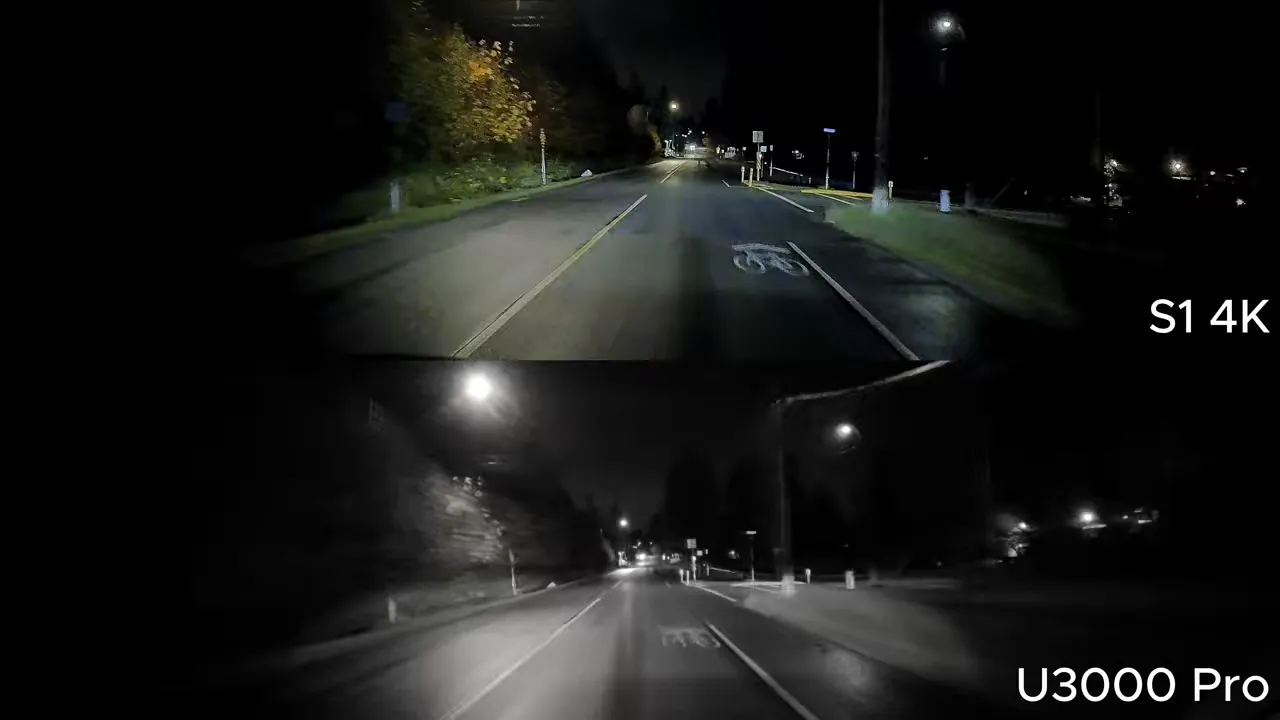
That does not mean any dash camera can guarantee a readable plate in every situation. Speed, darkness, glare, angle, and distance all matter. But the S1 gives you a strong starting point for getting meaningful evidence during daytime driving, dark roads, busy intersections, and tunnel transitions.
Storage, App Pairing, and Camera Options
The S1 supports microSD cards up to 512GB. For maximum reliability, use the Vueroid card, but Vueroid also lists the Lexar E-Series, SanDisk Extreme, SanDisk High Endurance, and SanDisk Max Endurance as supported options.
The camera pairs wirelessly with the Vueroid app through Bluetooth and Wi-Fi. With the ignition on, press the Wi-Fi button on the camera, wait about five seconds, select Find Device in the app, and confirm the pairing. The system creates a fresh password automatically, so there is no password to type in manually.
One important note for newer vehicles: wireless Apple CarPlay or wireless Android Auto may need to be temporarily disabled while pairing. This does not affect everyday recording. The S1 records independently to its microSD card, so there is no reason to stay connected to the app while driving.
From the app, you can adjust settings, access live view, download clips, update firmware wirelessly, and manage multiple installed cameras. This is particularly useful for families with several vehicles or fleet applications where each unit can be renamed for easier identification.
Parking Mode Is Where the Vueroid S1 Gets Interesting
The camera has four parking mode options:
- Time-lapse and impact detection: Continuously captures accelerated footage while parked, with event protection if an impact occurs.
- Motion and impact detection: Buffers footage constantly, then writes to the memory card when motion is detected.
- Extreme low power mode: Uses impact detection only, with exceptionally low current draw.
- Hybrid parking mode: Combines motion or time-lapse recording for a set period, then switches to extreme low power mode.
Motion Detection and Event Recording
In motion detection mode, the camera buffers continuously but only saves a video file when it sees movement. Front, rear, and interior cameras can all detect activity around the vehicle. That is a useful approach when you want coverage without filling the card with hours of empty footage.
If an impact occurs, the S1 saves the event with 10 seconds of footage before the impact. It also places the clip into an event folder, so you do not have to dig through every motion-triggered recording to find what happened.
Time-Lapse Mode With Real Impact Protection
Time-lapse mode saves storage space by recording in fast-forward. What makes the S1 different is what happens after an impact. It buffers 10 seconds before the incident, switches to 30 frames per second, and records audio if audio recording is enabled. Most dash cameras simply preserve fast-forward time-lapse footage without audio.
This is a major benefit if you use time-lapse to conserve card capacity but still want useful evidence after a parking lot incident.
Impact Detection Test Results
Impact detection, sometimes called G-sensor parking mode, is only useful if the camera wakes quickly enough to capture what happened. A camera that takes 10 or 15 seconds to wake up after an impact can miss the vehicle or person responsible entirely.
In testing across 12 popular dash cameras, the Vueroid S1 and Thinkware both woke in one second for both impacts, producing a combined score of two. Several competing cameras either took much longer or failed to wake consistently.
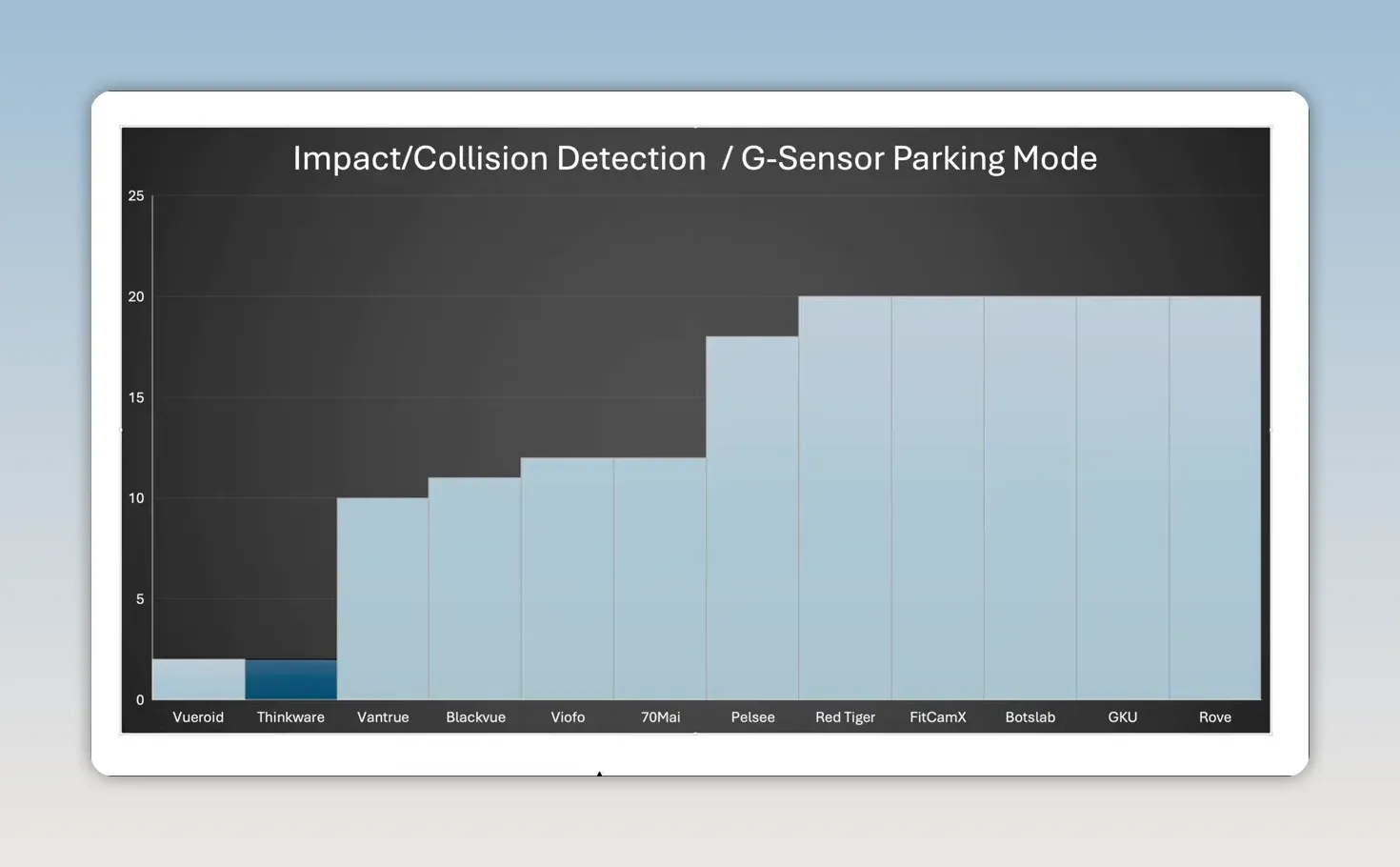
In the same tests, some units failed to wake from a front bumper impact, some woke only after a windshield strike, and some did not wake at all. High marketplace ratings do not necessarily prove that a dash camera has effective parking surveillance. Testing it under real impact conditions does.
Current Draw and Why It Matters for EVs and Smaller Batteries
Parking mode can be hard on a vehicle battery, especially with a three-channel dash cam. The S1's normal parking modes use a reasonable amount of power, but its extreme low power mode is the standout feature.
- Front camera motion and impact monitoring: About 375mA or 4.73W.
- Front camera motion and impact recording: About 392mA or 4.94W.
- Front camera time-lapse and impact recording: About 390mA or 4.91W.
- Extreme low power mode: About 1mA.
For the three-channel configuration, motion and impact operation ranges roughly from 500mA to 600mA, depending on infrared LED use. Recording can range from approximately 560mA to 620mA. Time-lapse and impact ranges from about 526mA to 598mA.
Even in three-channel mode, extreme low power impact detection remains at about 1mA. That makes this system especially appealing for hybrids, EVs, and vehicles with smaller batteries, including many Subaru, Toyota, Honda, and other Japanese vehicles.
Low Battery Protection Has More Flexibility Than Most
Parking mode is optional, but if you want to use it without unnecessarily draining your battery, the low battery cutoff must be set correctly for your vehicle.
The S1 provides cutoff settings from 11V for an external dash cam battery pack up to 13.9V for newer EV and hybrid battery systems. That is a major advantage over many cameras with fixed cutoff options that top out around 12.4V, or even lower depending on the hardwire cable.
Using an 11.6V cutoff on a vehicle with newer battery technology can be a bad combination. If you are unsure what your vehicle needs, use a multimeter to check battery voltage or consult a professional installer. The flexibility here helps futureproof the camera for evolving vehicle battery systems.
Quick Startup Recording
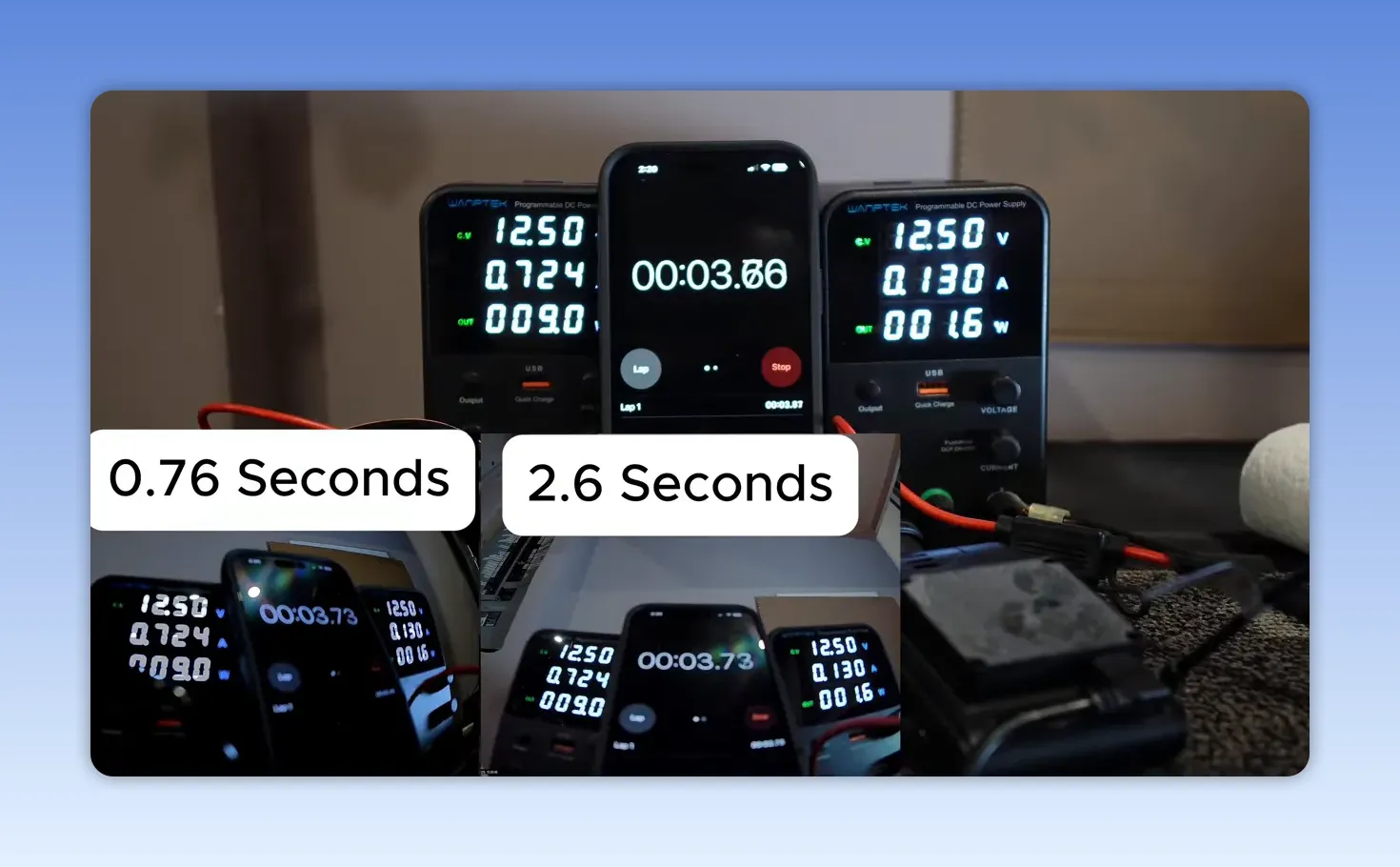
The S1 also starts recording very quickly after receiving power. In a test against the Thinkware U3000 Pro and Viofo A329S, the S1 began recording at 0.76 seconds. There was a measured 0.48-second delay between applying power and starting the phone timer, but it was still the fastest unit tested.
The Thinkware started at 2.6 seconds, while the Viofo took 21.53 seconds.
Recommended Vueroid S1 Setup Settings
Initial setup covers language, date format, time zone, and electrical frequency. North America should generally use 60Hz, while many other regions use 50Hz.
Resolution, Frame Rate, and Bitrate
My preferred front recording setting is 4K at 30 frames per second. The camera offers 4K 60fps, but 60fps does not provide a major practical advantage here. In a three-channel setup, selecting 4K 60fps causes the rear and interior cameras to drop to 15fps, which is not ideal.
Use mid bitrate unless you have a specific reason to use high. The visible difference between mid and high is not huge in typical use, while mid offers a balanced approach to storage.
Choose the Right Memory Allocation
The S1 lets you allocate card space based on how you use the camera:
- Driving recording priority: 60% driving, 20% parking, 15% driving event, 5% parking event.
- Parking recording priority: 30% driving, 50% parking, 15% driving event, 5% parking event.
- Event recording priority: For drivers who place special importance on protected events.
- Driving recording only: Uses the card entirely for driving footage when parking mode is not needed.
Driving recording priority is the best fit for most people. If parking surveillance is your primary concern, choose parking recording priority instead.
Driving Settings Worth Using
- Set audio to event only at a minimum.
- Use Infinite Play Capture for video enhancement while driving, especially for better low-light performance.
- Leave time-lapse while driving off unless you want scenic road-trip footage. It is not the right choice for capturing plates and critical evidence.
- Set driving impact sensitivity to mid.
- Set parking impact sensitivity to high.
- Keep motion sensitivity at mid for most vehicles. Consider high for a long vehicle and low for a very small vehicle.
Do not enable event video protection unless you are prepared to format the memory card regularly. Protected files can eventually fill the card and prevent normal loop recording.
How to Set Up Hybrid Parking Mode
Hybrid parking mode is one of the best ways to balance coverage and battery protection. Select either motion and impact or time-lapse and impact, then set the low power mode entry time. After that selected period, the S1 automatically moves into extreme low power impact detection.
A one-hour minimum is a sensible recommendation. It covers common higher-traffic stops such as shopping, dinner, coffee, and errands, where a parking lot incident is more likely. After the hour is over, the camera drops to approximately 1mA of current draw.
Use winter mode during cold winter months if you live in a province or state with very cold weather. Also consider setting a parking mode delay of 90 seconds or three minutes if door slams or normal exit activity are creating false parking events.
For video enhancement while parked, HDR or Premium Night Vision are the recommended choices. Premium Night Vision brightens the image somewhat more with higher contrast. Normal mode is not the ideal selection for overnight parking coverage.
Auto Rec Off Zone: Vueroid's Geofence Feature
Auto Rec Off Zone, also called geofence, can stop parking recording in locations where you do not need it. You can register up to three locations and set each zone to a 30, 50, or 100-yard radius.
For example, if your driveway has home security cameras or your workplace has extensive surveillance, there may be no reason to use the dash camera's battery power for parking mode there. You could set a zone for home, work, and a frequently visited relative's home.
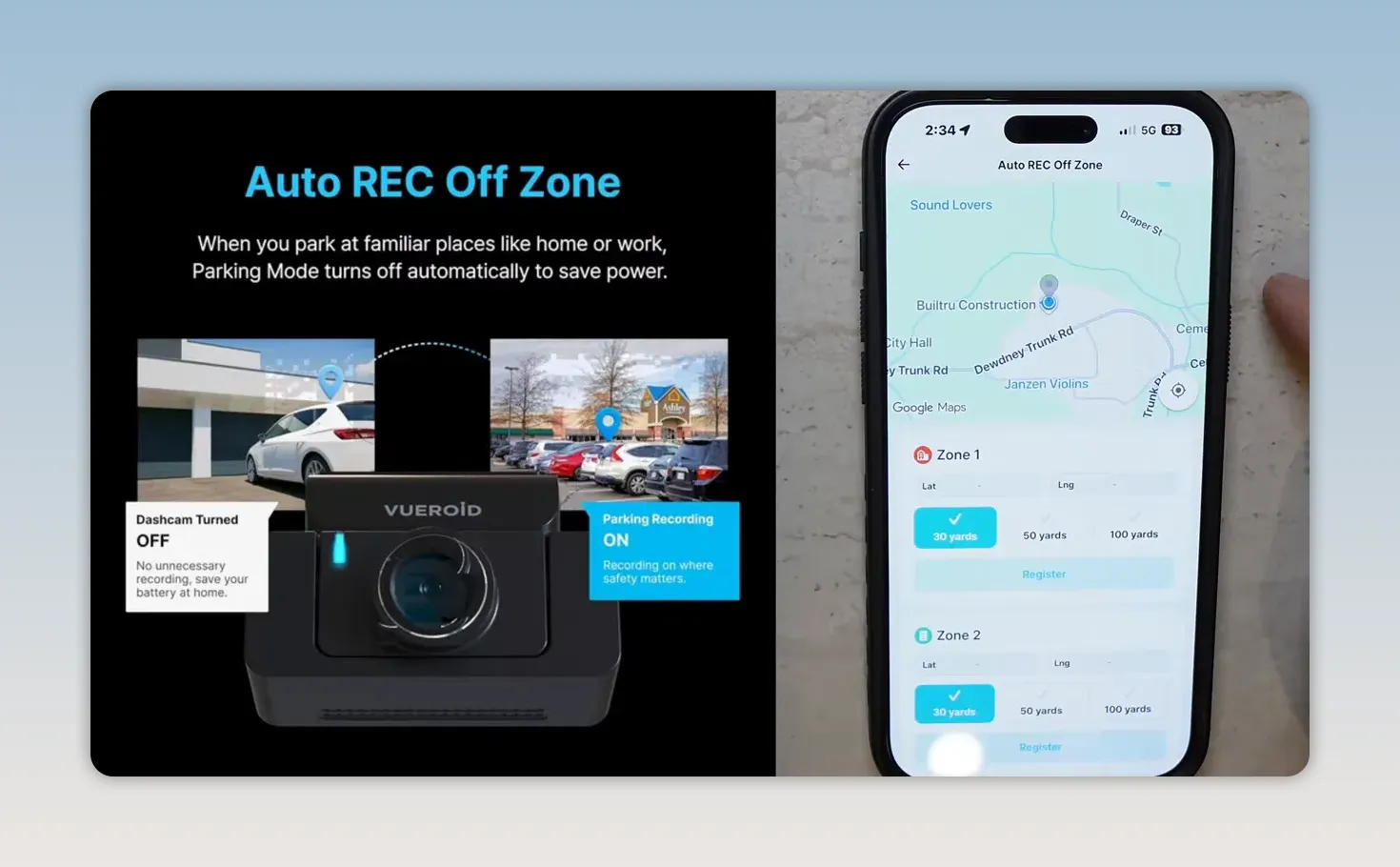
Keep in mind that GPS does not work underground. If you park in an underground garage, the geofence cannot reliably activate, so turn parking recording off manually using the switch on top of the unit if needed.
Useful Everyday Settings
Leave voice alerts on. It is useful to hear the confirmation that continuous recording has started. If a camera is unplugged during vehicle service or has a problem, audible startup confirmation can prevent you from unknowingly driving for weeks without recording.
Turn off the event alert tone if you do not want beeps from speed bumps or harder braking. I also recommend disabling the security LED because it can draw attention to the camera while parked.
The LCD can stay on, turn off after 30 seconds or one minute, or display a clock. You can also control the video stamp details individually, including brand, model, firmware version, date, time, channel, voltage, GPS speed, GPS coordinates, video enhancement setting, and frame rate. The stamp colour can be changed for visibility against different vehicle hoods and backgrounds.
Use 5GHz Wi-Fi unless your phone is older. It is the better choice for faster transfers with compatible devices.
Four Ways to Download Dash Cam Footage
The S1 makes footage retrieval straightforward. You can download clips in four ways:
- Wirelessly through the Vueroid mobile app.
- Directly to a USB-C iPhone or Android phone using the included USB-C to USB-C cable.
- Directly to a computer through USB-C.
- By removing the microSD card and using a card reader.
For direct USB-C phone access, turn off the camera, connect it to the phone, hold the appropriate button while turning the camera back on, and wait for the device to appear. On an iPhone, access the camera through the Files app, locate the relevant folder, select the video, and save it to Photos.
The folders separate continuous recordings, events, parking files, parking events, and manually saved recordings. That organization makes it easier to find the file you need after an incident.
Mount Design and Heat Protection
The camera can slide off its mount without unplugging the cables, which is excellent if you need to take the camera after a major accident or want to bring it inside to access footage. Make sure it clicks completely into place when reinstalling it. A partially attached camera can power on but lose connection after a bump.
The S1 also has Vueroid's Durashift parking mode for high heat. In extreme temperatures, the camera shifts from motion or time-lapse parking mode into low-power impact-only operation to avoid overheating. Once it cools, it returns to the selected parking mode.
This approach allows the camera to protect itself from heat while maintaining impact coverage. Vueroid's earlier D21 performed exceptionally well in a roughly 210-degree heat test, although the S1 has not yet been subjected to that exact same test.
Vueroid S1 4K Pros and Cons
What the S1 Does Well
- Strong daytime and nighttime video quality.
- Extreme low power parking mode at roughly 1mA.
- Excellent fit for EVs, hybrids, and vehicles with smaller batteries.
- Fast impact detection wake-up performance.
- Auto Rec Off Zone geofence feature.
- High-heat Durashift parking protection.
- Four flexible methods for downloading footage.
- Wide 170-degree infrared interior camera.
- Front CPL filter included in the box.
- Time-lapse automatically switches to 30fps with audio after an impact.
- Easy detachable mount.
- Hybrid parking mode for balanced coverage and energy use.
- Simple wireless pairing without manually entering a password.
Where It Could Improve
- No low-power motion detection or radar parking mode like the Thinkware U3000 Pro.
- Rear and interior cameras drop to 15fps in three-channel 4K 60fps mode.
- AI license plate restoration and privacy software still needs improvement.
- No LTE or cloud option.
- No telephoto camera.
- Interior camera is limited to 1080p, with no 2K interior option.
Final Verdict
The Vueroid S1 4K is a dash camera we are very happy with. It has excellent video quality, an extremely efficient impact-only parking mode, quick startup recording, flexible low battery protection, practical geofence capability, and a parking mode setup that can be tailored to real daily driving.
It is not for someone who specifically needs LTE cloud connectivity, telephoto coverage, or radar-based low-power motion detection. But for drivers who want strong evidence capture, energy-conscious parking protection, easy footage retrieval, and a camera built with modern vehicle batteries in mind, it is a very compelling option.
For help selecting the right setup, explore our dash cam collection or arrange professional dash cam installation in Greater Vancouver or Greater Toronto.
|
Vueroid S1 4K FAQ
Does the Vueroid S1 support a rear and interior camera?
Yes. It is available as front only, front and rear, or front, rear, and interior. The interior camera has infrared and a 170-degree viewing angle.
How much power does the Vueroid S1 use in low power parking mode?
Extreme low power impact detection uses approximately 1mA, including in the three-channel configuration.
Can the Vueroid S1 stop parking recording at home?
Yes. The Auto Rec Off Zone geofence feature can create up to three GPS-based zones where parking recording shuts off to preserve energy.
How can footage be downloaded from the Vueroid S1?
You can use the mobile app, connect by USB-C to a compatible phone, connect by USB-C to a computer, or remove the microSD card.