Best 4K Dash Cam 2026? Day, Night and Parking Mode Tested
A dash camera can produce great driving footage and still disappoint when somebody hits your parked vehicle. That is the biggest lesson from putting these five 4K dash cams through real-world testing.
We compared the VIOFO A329S, VIOFO T330, Vueroid S1 4K, 70mai A900 Ultra and Vantrue N4 Pro S for daytime footage, nighttime detail, changing light conditions, parking protection and video downloads. All five deliver good video day and night. The bigger differences show up in how they capture an incident, preserve the evidence and let you retrieve it.
My short answer: the A329S is the most versatile, the Vueroid is my pick for parking protection and EV or hybrid applications, and the Vantrue makes a lot of sense for rideshare drivers. But the details matter, especially if parking mode is a major reason you are buying a dash cam.
Quick Summary
- The VIOFO A329S offers the most versatility through camera expansion and optional SSD storage.
- The Vueroid S1 4K delivered the strongest parking protection in our five-camera comparison.
- The 70mai A900 Ultra produced good driving footage but showed significant parking-mode weaknesses.
- The Vantrue N4 Pro S suits rideshare drivers who want an integrated interior camera.
Table of Contents
- Parking Mode: Where the Biggest Differences Show Up
- Daytime, Nighttime and Tunnel Video Quality
- VIOFO A329S: The Most Versatile Choice
- Vueroid S1 4K: My Pick for Parking Protection
- VIOFO T330: Expandable, but Without a Screen
- 70mai A900 Ultra: Strong Driving Video and Easy File Navigation
- Vantrue N4 Pro S: A Practical Rideshare Setup
- How to Download Dash Cam Footage
- Which 4K Dash Cam Should You Buy?
Parking Mode: Where the Biggest Differences Show Up
“Parking mode” is not one feature. Motion detection, time-lapse recording and low-power impact detection all behave differently. We tested each mode separately rather than assuming that a camera with parking protection would handle every situation equally well.
Motion detection and buffered recording
For the first test, I drove a truck up the driveway towards the parked test vehicle. The goal was to see which cameras captured the approach, not just what happened once the truck was directly in front of them.
- VIOFO A329S and T330: Both provided approximately 15 seconds of buffered recording and were the first to capture the approach.
- Vueroid S1 4K and Vantrue N4 Pro S: Both provided approximately 10 seconds of buffered recording.
- 70mai A900 Ultra: There was no pre-event buffer in this test. Recording began only when activity was directly in front of the camera.
Buffered recording preserves footage from before the trigger. The camera continually holds recent footage temporarily, then saves that lead-up when it detects an event. That context can be important if you need to establish how a vehicle approached yours.
The 70mai’s detection appeared more focused on people than general vehicle movement. That became clearer during the rear-camera test: all five systems recorded me walking behind the vehicle, but the 70mai did not activate until I was directly behind it.
A simulated parking hit-and-run
Next, I made an impact against the test vehicle, got into the truck and reversed away. This mimics somebody pulling into a parking space, hitting your bumper and backing out to leave.
All five cameras captured the truck’s licence plate successfully in this particular test. However, recording an incident and flagging it as an event turned out to be two different things.
- The two VIOFO cameras locked the recording, placing it in the RO folder when viewing on a computer or the locked-video section in the app.
- The Vueroid placed the recording in its parking-event folder.
- The Vantrue and 70mai recorded the incident, but neither locked the clip nor placed it in a dedicated event folder.
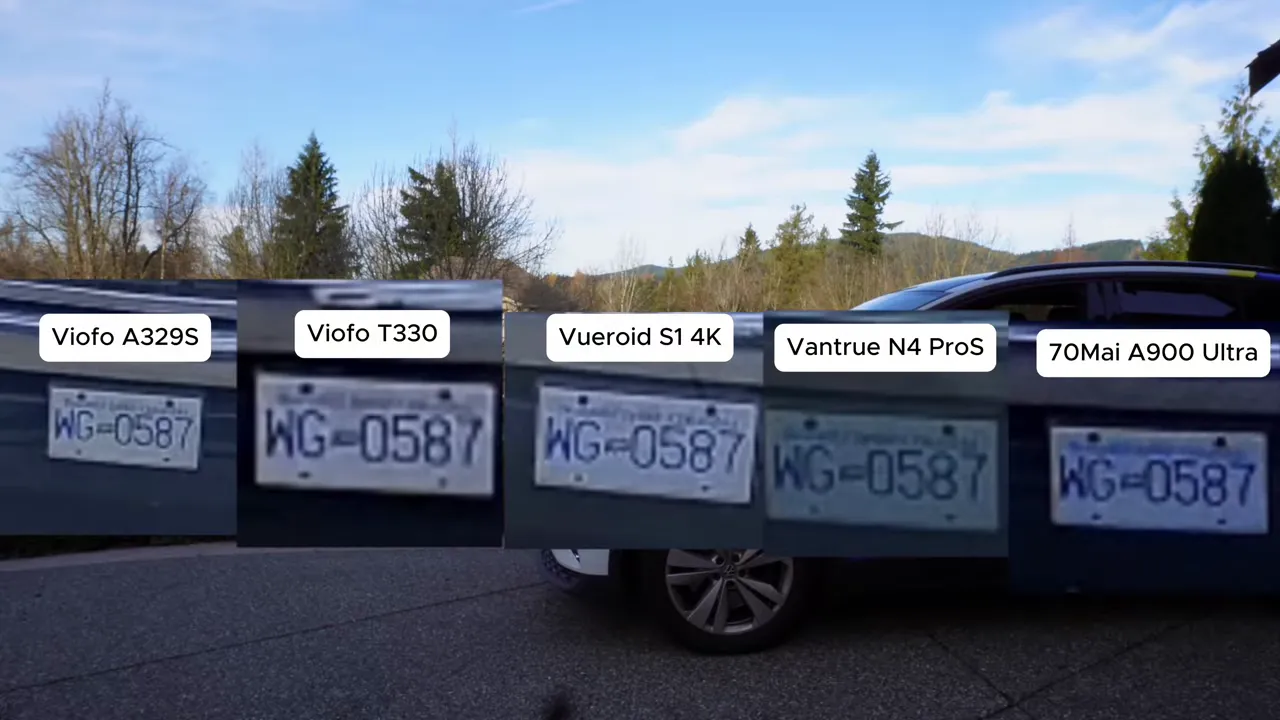
That distinction matters when you go looking for evidence. With the Vantrue and 70mai, the footage was there, but I had to find it among the recordings rather than in a clearly identified impact-event location.
Time-lapse recording and impact response
We set all five cameras to one frame per second. This produces a sped-up record of activity around the vehicle rather than normal-speed video. Then I made another impact to see whether the cameras changed their recording behaviour.
The Vueroid stood out. It saved a 30 fps event recording with 10 seconds of pre-impact footage, plus audio when audio recording was enabled. That gives you normal-speed evidence around the collision instead of only a sequence of one-second snapshots.
The 70mai also produced normal-speed footage around the impact, but there was a serious gap: I could not find the 10 seconds leading up to the impact in any folder. It was not in the time-lapse recordings, motion files or parking files.
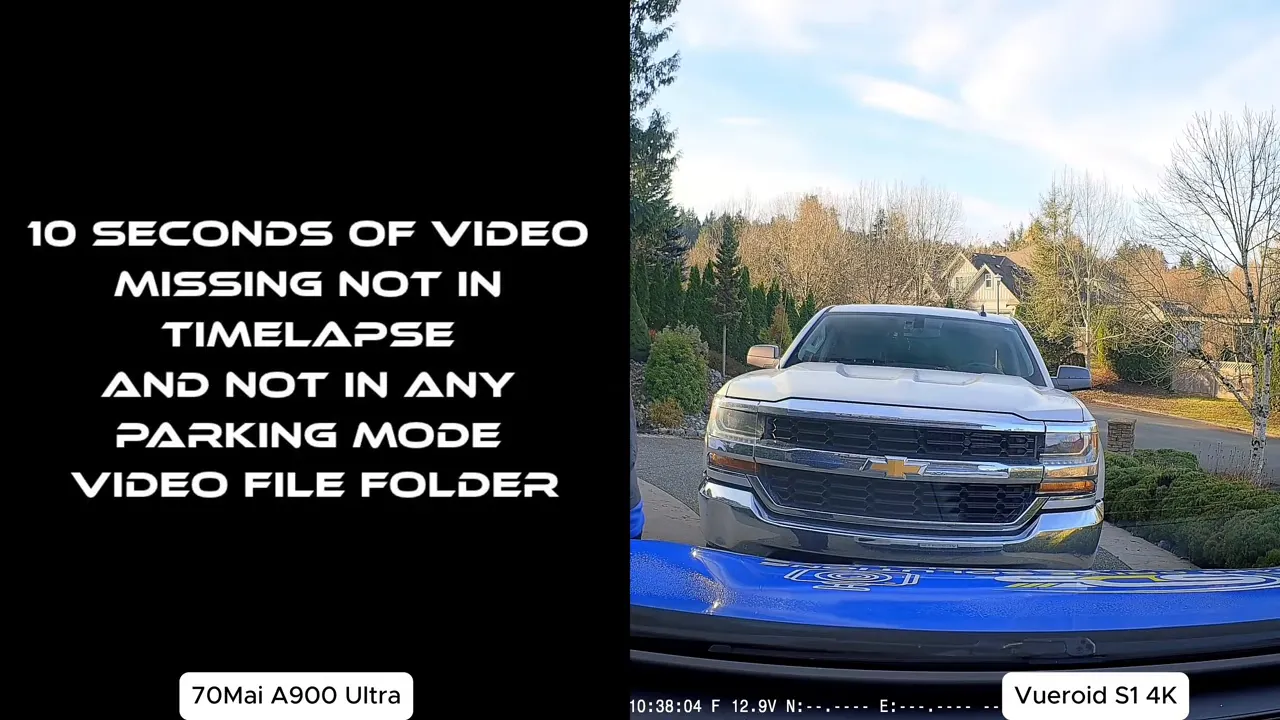
The A329S, T330 and N4 Pro S continued recording in time-lapse after the impact. They did not switch to normal-speed 30 fps recording. This is a frame-rate difference, not simply a question of whether the camera records in 4K.
Low-power impact detection: How quickly do they wake up?
For longer parking periods, these cameras offer modes that reduce power consumption and wake the system after a collision. VIOFO calls its version low-power impact detection, Vueroid uses extreme low-power mode, and Vantrue and 70mai use collision detection.
Here were the observed wake-up times after an impact:
- Vueroid S1 4K: Approximately 1 second.
- VIOFO A329S: Approximately 2 seconds.
- VIOFO T330: Approximately 3 seconds.
- Vantrue N4 Pro S: Approximately 6 seconds.
- 70mai A900 Ultra: Did not wake up in our testing.
I repeated the 70mai test, then tested it separately in my own vehicle. It still did not activate, including after a door slam. That is the result from the unit and setup I tested, not a diagnosis of every A900 Ultra, but it is a concern I cannot ignore.
A six-second delay also matters. A camera can have excellent image quality, but if the vehicle responsible has already left before recording begins, that quality does not help much.
Daytime, Nighttime and Tunnel Video Quality
Daytime footage: Good performance across the group
All five cameras produced good daytime footage. We compared them on the same drive, rotating the five camera feeds through four comparison positions so each image remained reasonably large.
I would not choose between these cameras based on the 4K label alone. The daytime results make all five worth considering. Camera expansion, parking behaviour, file access and battery protection are more useful ways to narrow the choice.
The tunnel test is not just about tunnels
People sometimes dismiss tunnel testing because they rarely drive through one. But the same exposure challenge happens when you turn away from direct sunlight or move between bright roads and deep shade.
The camera has to adapt from bright light to darkness, then back to bright light again. Older dash cameras I have tested could take around five seconds to adjust. All five of these units handled the lighting transitions very well.
That is a meaningful improvement. You want useful footage during the change in lighting, not just once conditions have settled.
Nighttime footage: Settings affect the comparison
All five cameras used some form of night processing or HDR-related functionality during the nighttime comparison. The useful details to assess are street signs, licence plates and the surrounding road scene, rather than brightness alone.
The Vantrue’s image was darker because I used its PlatePix option. I chose that setting expecting it to help capture licence plates. Vantrue advised that HDR would produce a brighter image, but that was not the setting used here.
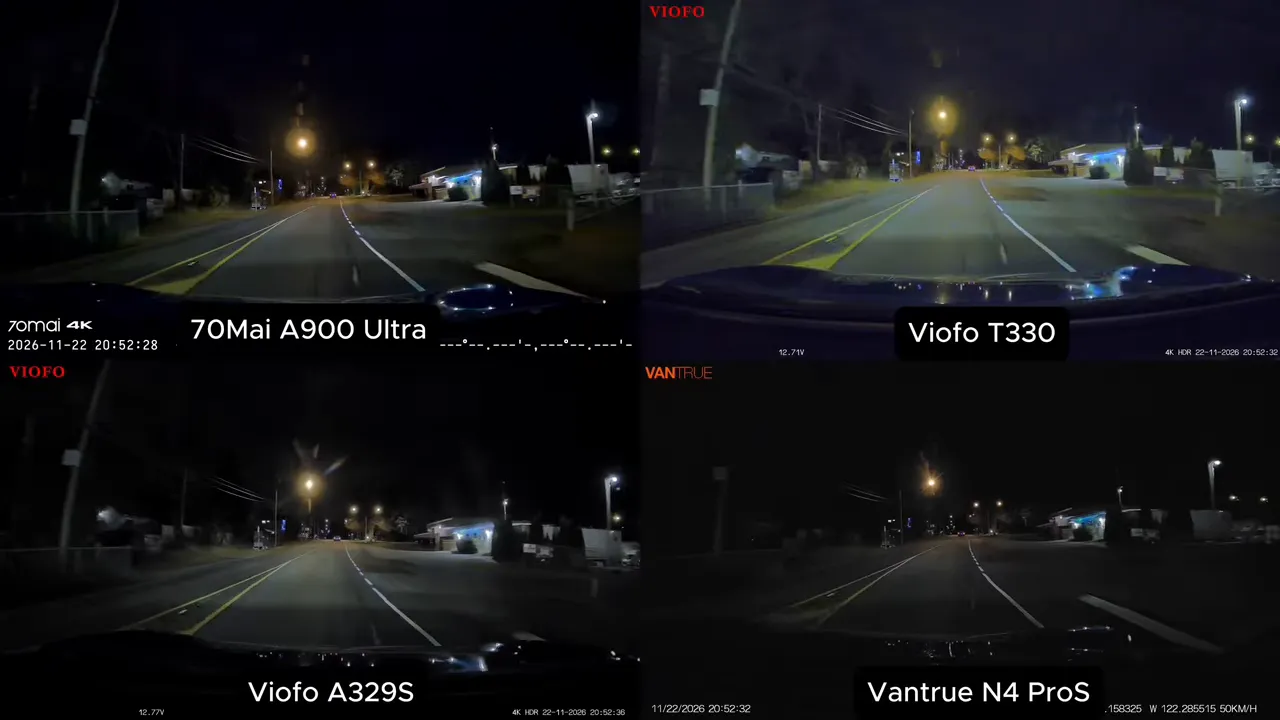
That does not make the Vantrue unusable at night. Its footage was still good, especially compared with some other 4K cameras that produce extremely dark images. It does mean this comparison should not be read as a test of every camera’s brightest available setting.
We also included a close-range pass of a stationary vehicle in very dark surroundings to assess plate detail. As with the daytime results, I rate all five as good day-and-night performers rather than declaring one universal image-quality winner.
VIOFO A329S: The Most Versatile Choice
If you want a system with room to change as your needs change, the A329S would be my starting point. It supports a rear camera plus either a telephoto camera or a 2K interior camera, including a fisheye interior option. It also supports external SSD storage.
Controls and installation details
The front controls provide power and photo capture, recording start and stop, manual emergency recording, and microphone control. Holding the microphone control for approximately five seconds toggles Wi-Fi.
The microSD slot and additional camera connections sit on one side, with a USB-C connection for SSD storage on the other. I recommend VIOFO’s SSD cable for that setup. Power connects through the GPS mount, with HK4 or HK6 hardwire-cable options discussed for this unit.
What I like
- Good daytime and nighttime video, plus four footage-retrieval routes through wireless access, card removal and direct USB connections to a phone or computer.
- Telephoto or 2K interior-camera expansion and optional SSD storage.
- An included front CPL filter, with optional rear and telephoto CPL filters.
- Hybrid parking mode that can transition to low-power impact detection after a selected time or voltage condition.
- Wi-Fi 6, optional Bluetooth remote support and a slim rear-camera cable that helps with installation.
- Geofencing that can switch the camera off in selected locations to conserve power.
What needs improvement
Some customers have reported SSD stability challenges. Time-lapse recording does not switch to 30 fps after an impact, and microSD support is limited to the VIOFO and SanDisk Max Endurance options identified for this setup.
I would also like more modern low-battery protection choices for newer EVs and hybrids. The A329S is versatile, but that does not automatically make it the strongest parking-mode choice for every vehicle.
Vueroid S1 4K: My Pick for Parking Protection
Out of these five cameras, the Vueroid S1 4K has the strongest parking-mode package. Its advantage is not one isolated specification. It combines fast wake-up, buffered impact recording and a broader range of low-voltage protection settings.
Controls and mounting
The front buttons handle manual recording, menu access, screen views, audio settings and Wi-Fi. Audio can be enabled, disabled or limited to events. There is a USB-C connection on one side, a microSD slot on the other, and a physical power switch on top.
The GPS mount slides off, allowing you to remove the main unit without disconnecting the installed wiring. The front lens adjusts up and down to suit the windshield angle.
What I like
- Approximately one-second wake-up in the low-power impact test.
- Extreme low-power mode with a stated current draw of 1 mA.
- Time-lapse impact events saved at 30 fps, with a 10-second pre-event buffer and optional audio.
- Low-battery protection options spanning 11 to 13.9 volts, making it my preferred option here for EV and hybrid applications.
- Hybrid parking mode that switches to extreme low-power mode after a selected timer.
- An auto-recording-off zone feature, similar in purpose to VIOFO’s geofencing.
- Four ways to retrieve footage, an included front CPL filter and good high-heat performance.
Pairing is convenient, too. Bluetooth and Wi-Fi work together without requiring you to type a password, and the connection password changes automatically with pairing.
What needs improvement
The AI licence plate recognition software is improving, but it still needs work. There is no telephoto or 2K interior-camera option, and the available interior camera uses a first-generation 1080p Sony STARVIS sensor.
For somebody prioritizing parked-vehicle protection over camera expansion, those compromises would not change my recommendation.
VIOFO T330: Expandable, but Without a Screen
The T330 offers many of the A329S’s useful features in a screenless design. It supports a rear camera plus either an interior camera or a telephoto camera, including a 2K fisheye interior option.
Controls and setup
Physical controls cover power, manual event recording, recording start and stop, microphone, Wi-Fi and photo capture. The body swivels for adjustment, and the magnetic CPL filter has alignment marks that need to line up for the best result.
The camera connections and power input are grouped at the end, with the microSD slot nearby. Hardwire-cable options discussed for the T330 include HK4, HK6 and HK6F.
The cable naming is not exactly getting simpler, so matching the correct kit to the camera and installation is worth checking before you buy.
What I like
- Good video day and night and four footage-retrieval methods.
- Telephoto or 2K interior-camera expansion.
- An included front CPL filter and optional rear or telephoto CPL filters.
- Hybrid parking mode, low-power impact detection and geofencing.
- Wi-Fi 6, optional Bluetooth remote support and a slim rear-camera cable.
What needs improvement
No LCD means settings changes rely on the smartphone app. That is fine for some people, but less convenient if you prefer using controls and menus directly on the camera.
Like the A329S, the T330 does not switch from time-lapse to 30 fps after an impact, has the same identified microSD-card support limitations, and would benefit from updated low-battery protection options.
Some customers also find the body larger than expected, even though its size is similar to BlackVue DR-series cameras. Screenless does not necessarily mean tiny.
70mai A900 Ultra: Strong Driving Video and Easy File Navigation
The A900 Ultra has made real progress in video quality. It also has one of my favourite approaches to organizing footage. If you want a front-and-rear system with an approachable app, it deserves consideration.
The unit has an LCD with context-sensitive buttons, a microSD slot, rear-camera connection and an included front CPL filter. Unlike the VIOFO options, it is strictly a two-channel system, with no interior or telephoto expansion.
What I like
- Good daytime and nighttime footage.
- A 4K rear camera.
- An easy-to-use app and slim rear-camera cable.
- Separate front and rear video folders when viewing on desktop that make finding footage straightforward.
- An optional LTE accessory for the USA, but not Canada, as covered in this comparison.
The folder structure deserves credit. With VIOFO and Vueroid, you identify front and rear recordings using F or R in the filename. Vantrue uses A, B and C identifiers. The 70mai’s separate folders are simply easier to navigate, and I would like other brands to follow that approach.
What needs improvement
Parking mode needs significant refinement based on my tests. The lack of motion buffering, missing pre-impact time-lapse footage and failure to wake in collision detection are substantial drawbacks if parked protection is your priority.
I would also like newer low-battery protection options for EVs and hybrids. Finally, the rear camera records at 25 fps in 4K, rather than 30 fps.
Vantrue N4 Pro S: A Practical Rideshare Setup
The Vantrue’s built-in interior camera is its big practical advantage. For Uber and Lyft drivers who want cabin coverage without adding a separate interior-camera body, that layout is appealing.
The interior lens adjusts vertically. The main unit attaches to a magnetic mount, and physical controls handle manual recording, Wi-Fi, audio, display views, recording and menu access. The rear-camera connection is on top.
The microSD slot sits behind the magnetic manual-recording button cover. Remove it carefully rather than pulling hard on the assembly.
What I like
- Good daytime and nighttime footage, with the PlatePix brightness caveat noted earlier.
- An easy-to-use app.
- An integrated, adjustable interior camera.
- Support for a 1 TB microSD card, the only camera in this comparison identified with that capacity.
- Accessory-based LTE options that, to my understanding at the time of testing, cover both the USA and Canada.
What needs improvement
There is no telephoto option, and the approximately six-second collision-mode wake-up is slow compared with the Vueroid and VIOFO cameras.
The unit is also relatively large. Current draw is high in its other parking modes, with the three-channel configuration contributing to that demand. As with most of this group, I would like more modern low-battery protection settings.
Future product updates may improve wake-up performance, but my recommendation here is based on the camera tested, not promised improvements.
How to Download Dash Cam Footage
Footage retrieval is easy to overlook until you need a clip at the roadside. There are several approaches, but not every camera supports all of them.
Use the smartphone app
With the vehicle safely parked and the ignition on, connect your phone to the camera through its app, locate the recording and download it. All five systems provide app-based access.
This is convenient for everyday use, but it depends on having the camera powered and accessible.
Remove the microSD card
All five use microSD cards, and most of these packages do not include one, so budget for storage separately. A microSD card can go into a full-size SD adapter or directly into a compatible USB card reader.
My preference is a reader that plugs straight into the computer and accepts either card size. For background on the physical formats, the SD Association’s memory-card guide explains the distinction.
All five cameras save MP4 files, which makes basic playback straightforward without dedicated dash cam desktop software.
Connect the camera directly to a phone or computer
Direct USB file access worked with the VIOFO T330, VIOFO A329S and Vueroid S1 4K. It did not work with the 70mai A900 Ultra or Vantrue N4 Pro S using this retrieval method.
For the Vueroid, direct file access required a specific startup sequence involving its power switch and a button hold of approximately five to ten seconds. It was not simply a case of plugging it in while operating normally.
For phone access, the setup demonstrated requires a compatible USB-C Android phone or a USB-C iPhone, such as an iPhone 15 or newer. You can also connect supported cameras to a computer, using USB-C or an appropriate USB-A-to-USB-C cable.
The practical benefit is significant after a collision. You can remove a supported camera and access the files away from the vehicle, rather than needing to return to a damaged interior to establish an app connection.
Which 4K Dash Cam Should You Buy?
There is no single winner for every driver. Here is how I would choose from this group:
- Choose the VIOFO A329S for versatility. Telephoto, 2K interior-camera and SSD options give it the broadest range of configurations here.
- Choose the Vueroid S1 4K for parking protection. Its fast wake-up, buffered normal-speed impact recording and low-voltage settings make it my first choice for that job, especially for EVs and hybrids.
- Consider the VIOFO T330 if you prefer a screenless VIOFO system. You retain useful expansion and connectivity features, but need to be comfortable using the app for settings.
- Consider the 70mai A900 Ultra for front-and-rear driving coverage and simple file navigation. Its video is good, but I would not make it my parking-protection pick based on these results.
- Choose the Vantrue N4 Pro S for convenient cabin coverage. The integrated interior camera is particularly useful for rideshare work, provided you accept its size and parking-mode compromises.
The right purchase is the camera that fits your vehicle and the evidence you most need to capture. Good 4K driving footage is important, but so are the seconds before an impact, the time it takes to wake up and how easily you can get the recording into your hands.
We supply dash cameras across Canada and offer installation in Greater Vancouver and Greater Toronto. Matching the camera, parking settings and power connection to your vehicle is just as important as choosing the model.
|